
OpenAI/Anthropic Tool-Use APIs, Schema Design, Parallel Calls, Error Handling, Retry Logic
1. Overview & Why This Matters
Tool calling — also called function calling — is the mechanism that transforms an LLM from a text generator into an agent capable of interacting with the real world. Without it, an agent can only reason over information it was trained on or was given in the prompt. With it, agents can query live databases, execute code, call REST APIs, read files, send messages, and take actions in external systems.
Tool calling is deceptively simple to get started with and surprisingly deep to get right in production. The difference between a demo-grade tool-calling implementation and a production-grade one lies in how you handle schema design, parallel calls, ambiguous inputs, tool errors, retries, and security. This topic covers all of it.
| Core question: How do you define, invoke, handle, and secure LLM tool calls such that your agent reliably executes the right actions with the right parameters and recovers gracefully from failures? |
2. How Tool Calling Works Under the Hood
2.1 The Tool Call Lifecycle
Understanding the exact request-response cycle prevents a class of production bugs that stem from misunderstanding what the model is actually doing when it ‘calls a tool’.
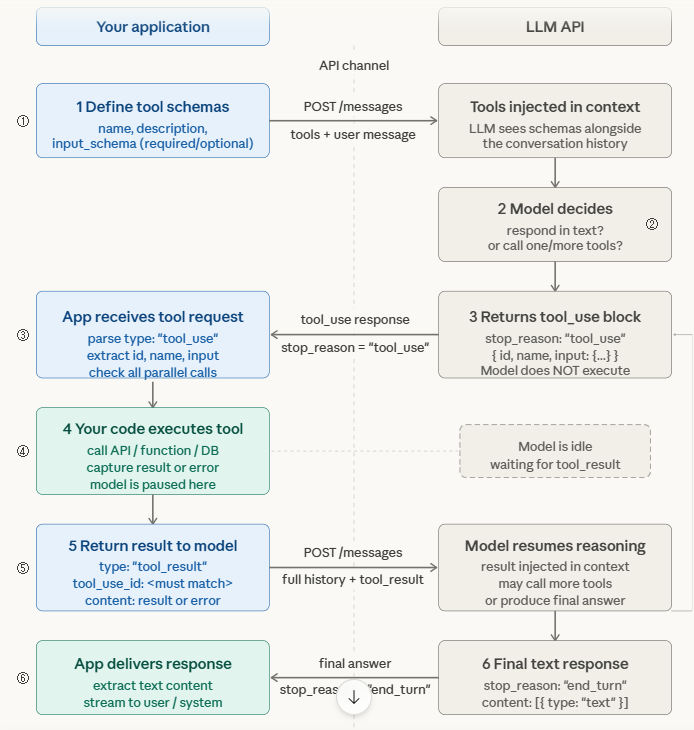
| TOOL CALLING LIFECYCLE 1. Developer defines tools as JSON schemas in the API request (name, description, input_schema with required/optional params) 2. LLM receives user message + tool definitions in context Model decides: respond in text OR call one/more tools 3. If tool call: model returns stop_reason=’tool_use’ with tool_use block: { id, name, input: {…} } (Model does NOT execute the tool — it only requests it) 4. YOUR CODE executes the tool with the provided input Capture result (or error) 5. Return tool result back to model as tool_result message with matching tool_use_id 6. Model continues reasoning with the result in context May call more tools or produce final text response |
The critical insight: the LLM never executes tools itself. It outputs a structured request. Your application code is responsible for execution, validation, error handling, and returning results. This puts all reliability engineering in your hands.
2.2 Tool Schema Design — The Most Impactful Thing You Control
The quality of your tool schema directly determines the quality of tool selection and parameter extraction. Treat every schema field as prompt engineering — the model reads descriptions as instructions.
| # WEAK schema — causes wrong invocations and missing params tools = [{‘name’: ‘get_data’, ‘description’: ‘Get data’, ‘WEAK schema — causes wrong invocations and missing params tools = [{‘name’: ‘get_data’, ‘description’: ‘Get data’, ‘input_schema’: {‘type’: ‘object’, ‘properties’: { ‘id’: {‘type’: ‘string’}, ‘type’: {‘type’: ‘string’} }}}] STRONG schema — precise, bounded, with examples tools = [{ ‘name’: ‘get_cell_kpi_timeseries’, ‘description’: ”’Retrieve KPI timeseries for a 5G NR cell. Use when the user asks about cell performance, throughput, PRB utilisation, or signal quality over a time window. Do NOT use for alarm queries — use get_alarms instead.”’, ‘input_schema’: { ‘type’: ‘object’, ‘properties’: { ‘cell_id’: { ‘type’: ‘string’, ‘description’: ‘Cell Global Identity in format MCC-MNC-TAC-CID (e.g. 422-51-1234-56789)’ }, ‘kpi_names’: { ‘type’: ‘array’, ‘items’: {‘type’: ‘string’, ‘enum’: [‘DL_THROUGHPUT_MBPS’,’UL_THROUGHPUT_MBPS’, ‘PRB_UTIL_DL’,’SINR_AVG’,’RRC_CONNECTED_USERS’]}, ‘description’: ‘KPIs to retrieve. Always specify explicitly.’ }, ‘window_minutes’: { ‘type’: ‘integer’, ‘minimum’: 5, ‘maximum’: 1440, ‘description’: ‘Lookback window in minutes. Default 60 if not specified by user.’ } }, ‘required’: [‘cell_id’, ‘kpi_names’] } }] |
Schema design rules that matter most:
- Use enum for bounded parameter values: If a parameter has a fixed set of valid values (KPI names, severity levels, actions), use enum in the schema. This eliminates hallucinated parameter values — a major source of tool errors.
- Write negative descriptions: Tell the model what the tool does NOT do. ‘Do not use for X — use Y instead’ prevents wrong tool selection on ambiguous queries.
- Include example values in descriptions: For ID formats, timestamps, or domain-specific strings, show the exact format in the description. The model will follow the format more reliably than any format: directive.
- Mark required vs optional clearly: Only include fields in required that are truly required. Optional fields with good defaults let the model succeed even when the user doesn’t specify everything.
2.3 Parallel Tool Calls
Modern LLMs (GPT-4o, Claude 3.5+, Gemini 1.5+) can request multiple tool calls simultaneously in a single response. This is critical for performance — instead of sequential round-trips, the model batches independent lookups.
| Claude parallel tool call response (simplified) response.content = [ {‘type’: ‘text’, ‘text’: ‘Let me check both cells simultaneously.’}, {‘type’: ‘tool_use’, ‘id’: ‘tu_01’, ‘name’: ‘get_cell_kpi_timeseries’, ‘input’: {‘cell_id’: ‘422-51-1234-56789’, ‘kpi_names’: [‘DL_THROUGHPUT_MBPS’]}}, {‘type’: ‘tool_use’, ‘id’: ‘tu_02’, ‘name’: ‘get_cell_kpi_timeseries’, ‘input’: {‘cell_id’: ‘422-51-1234-56790’, ‘kpi_names’: [‘DL_THROUGHPUT_MBPS’]}} ] WRONG: naive handler that only processes first tool_use block RIGHT: collect ALL tool_use blocks, execute in parallel, return ALL results import asyncio tool_calls = [b for b in response.content if b[‘type’] == ‘tool_use’] results = await asyncio.gather(*[execute_tool(tc) for tc in tool_calls]) Return ALL results with matching IDs tool_results = [{‘type’: ‘tool_result’, ‘tool_use_id’: tc[‘id’], ‘content’: str(result)} for tc, result in zip(tool_calls, results)] |
3. Error Handling & Retry Patterns
3.1 Tool Error Passback — Never Hide Failures
The single most important rule: always return tool errors back to the model as tool_result messages, not as exceptions that terminate the loop. The model can reason about errors and adapt — but only if it sees them.
| async def execute_tool_safe(tool_call: dict) -> dict: try: result = await dispatch_tool(tool_call[‘name’], tool_call[‘input’]) return { ‘type’: ‘tool_result’, ‘tool_use_id’: tool_call[‘id’], ‘content’: json.dumps(result) } except ToolTimeoutError as e: async def execute_tool_safe(tool_call: dict) -> dict: try: result = await dispatch_tool(tool_call[‘name’], tool_call[‘input’]) return { ‘type’: ‘tool_result’, ‘tool_use_id’: tool_call[‘id’], ‘content’: json.dumps(result) } except ToolTimeoutError as e: return { ‘type’: ‘tool_result’, ‘tool_use_id’: tool_call[‘id’], ‘is_error’: True, ‘content’: f’Tool timed out after {e.timeout}s. Try a smaller time window.’ } except ToolValidationError as e: return { ‘type’: ‘tool_result’, ‘tool_use_id’: tool_call[‘id’], ‘is_error’: True, ‘content’: f’Invalid parameter: {e.param}. Valid values: {e.valid_values}’ } except Exception as e: return { ‘type’: ‘tool_result’, ‘tool_use_id’: tool_call[‘id’], ‘is_error’: True, ‘content’: f’Tool execution failed: {str(e)}’ } excel.Quit() |
3.2 Retry Logic & Exponential Backoff
Tools fail. APIs time out. Databases have transient errors. Your tool execution layer needs intelligent retry logic that distinguishes retryable failures from permanent ones.
| Error Type | Retryable? | Strategy |
| HTTP 429 Rate Limit | Yes | Exponential backoff with jitter. Respect Retry-After header. |
| HTTP 503 / 504 Timeout | Yes (limited) | Retry up to 3x with backoff. After 3 failures, return error to model. |
| HTTP 400 Bad Request | No | Return error to model immediately — retrying won’t help. Model should reformulate. |
| HTTP 401 / 403 Auth Error | No | Return auth error to model. Do not retry — escalate to human or fail gracefully. |
| Tool Validation Error | No | Return specific validation message. Model can correct the parameter. |
| Empty / Null Result | Context-dependent | Not an error — return ‘no data found for these parameters’. Model adapts. |
3.3 Tool Security Considerations
Tool calling introduces a direct code execution risk surface. Any tool that takes external input and acts on a system must be hardened:
- Validate all inputs at the tool layer: Never trust the model’s input as safe. Validate types, ranges, and formats in your tool implementation regardless of schema constraints.
- Implement least-privilege tool access: A read-only tool should never have write credentials. Separate tool permission scopes explicitly.
- Audit every tool call: Log tool name, input parameters, calling agent identity, and result to an immutable audit log. This is mandatory for enterprise and regulatory environments.
- Prompt injection via tool results: A malicious external system could return content in a tool result designed to hijack the agent’s reasoning. Sanitise tool results before injecting them back into the model context.
4. Market Landscape: Tool Calling in 2025
| Provider / Tool | Tool Calling Capabilities |
| Anthropic Claude 3.5+ | Parallel tool calls, tool_choice forcing (auto/any/specific), extended thinking with tools, JSON-validated inputs |
| OpenAI GPT-4o | Parallel calls, strict mode (schema enforcement), response_format JSON schema, function calling v2 |
| Google Gemini 1.5/2.0 | Function calling, auto tool selection, code execution tool built-in, grounding with Google Search |
| Ollama + Qwen2.5/Llama3 | Tool calling via OpenAI-compatible API. Reliability varies by model — test your specific tools per model. |
| Instructor (Python lib) | Forces structured output via tool calling. Validates against Pydantic models. Best for schema-strict outputs. |
| LangChain Tools | Tool abstraction layer, BaseTool/StructuredTool classes, built-in retry and error handling wrappers |
| Emerging pattern — Tool Choice Forcing: Use tool_choice=’required’ (Anthropic) or function_call=’force’ (OpenAI) when you need the model to always use a tool rather than respond in text. Essential for structured data extraction tasks where you cannot accept a free-text response. |
5. Failure Modes & Pitfalls
| Failure | Cause | Fix |
| Wrong tool selected | Ambiguous tool descriptions, overlapping tool names | Write distinct descriptions with explicit NOT-use cases; add discriminating examples |
| Hallucinated parameters | Model invents parameter values not in the input | Use enum constraints; include example values in description; validate in tool layer |
| Silent parallel call drop | Handler only processes first tool_use block | Always collect ALL tool_use blocks in response; execute and return all results |
| Tool result mismatch | Wrong tool_use_id returned with result | Always match results to calls by ID; never assume order |
| Infinite tool loop | Model keeps calling tools without producing final answer | Set max_tool_calls limit; detect repeated (tool, same_input) pattern |
| Injection via tool result | External API returns adversarial content in result | Sanitise tool results; wrap in structured schema before returning to model |
6. Expert Tips & Quick Reference
| Expert Practitioner Tips 1. Write tool descriptions like API docs for a junior developer — explicit, with examples, with explicit NOT-use cases. This is the highest-ROI prompt engineering you can do. 2. Use strict/enum parameter schemas in production. Hallucinated parameter values are the #1 source of tool execution errors in production agents. 3. Always handle parallel tool calls. A single-call handler silently drops tool calls when the model batches them — this is invisible and hard to debug. 4. Return all errors to the model as tool_result with is_error:true. Models recover gracefully from errors they can see; they hallucinate solutions to errors they can’t. 5. Audit every tool call with agent identity, inputs, outputs, and timestamp. In enterprise environments this is a compliance requirement, not a nice-to-have. 6. Test tool calling with adversarial inputs — what happens if the model passes an empty string, a negative number, or an SQL injection string to your tool? Your tool layer must handle it. |